
Admin panel for Squad

Squad admin panel for your Squad servers

SquadFlow is a web-based Squad admin panel and Squad admin tool for the game Squad. Manage servers, players, bans and permissions with real-time logs, analytics and open Squad API documentation.

SquadFlow не является официальным продуктом Offworld Industries. Это независимый Squad admin tool для администраторов серверов Squad.

Servers · Players · LogsSquad admin panel preview
Squad admin panel dashboard preview in SquadFlow

Everything a Squad admin needs

No more raw RCON console and scattered tools. A clean Squad admin panel that centralizes Squad server administration for your team.

Server management

Start, stop and restart servers, switch maps and adjust core settings without touching the host directly — all inside one Squad admin panel.

Player & server control

Perform quick actions on players and server settings directly from the browser, instead of juggling separate Squad admin tools.

Players & bans

Search by SteamID, apply bans and restrictions with reasons and durations in one place — a structured approach to Squad administration.

Live logs

Kills, deaths, chat and reports with filters and full-text search for fast incident review on your Squad servers.

Analytics & metrics

Online over time, server load, admin and player activity in compact charts built into the admin panel.

Public API & integrations

Open Squad API documentation, request examples and integrations with Discord bots or external admin panels.

Where SquadFlow fits into your stack

  1. 1

    Connect your servers

    Create a server inside SquadFlow, set IP, port and access key. The Squad admin panel sits on top of the hosting you already use.

  2. 2

    Set up roles

    Depending on admin level they can not only manage players and moderate servers, but also manage clans, settings and configs, and open screenshots fullscreen for detailed reviews.

  3. 3

    Use it daily

    Monitor online activity, react to reports, track offenders and build analytics for your community — full cycle Squad server administration.

Why SquadFlow instead of legacy Squad admin tools

Most existing Squad admin tools were built as raw utilities. SquadFlow is designed from day one as a modern Squad admin panel for teams and communities.

  • Modern, minimal interface that stays fast and gets out of the way of day-to-day Squad administration.
  • More capabilities: manage servers, players, bans, clans, configs and settings from a single Squad admin dashboard.
  • Deep configuration: flexible permissions, detailed server parameters and fine-tuning for your community.
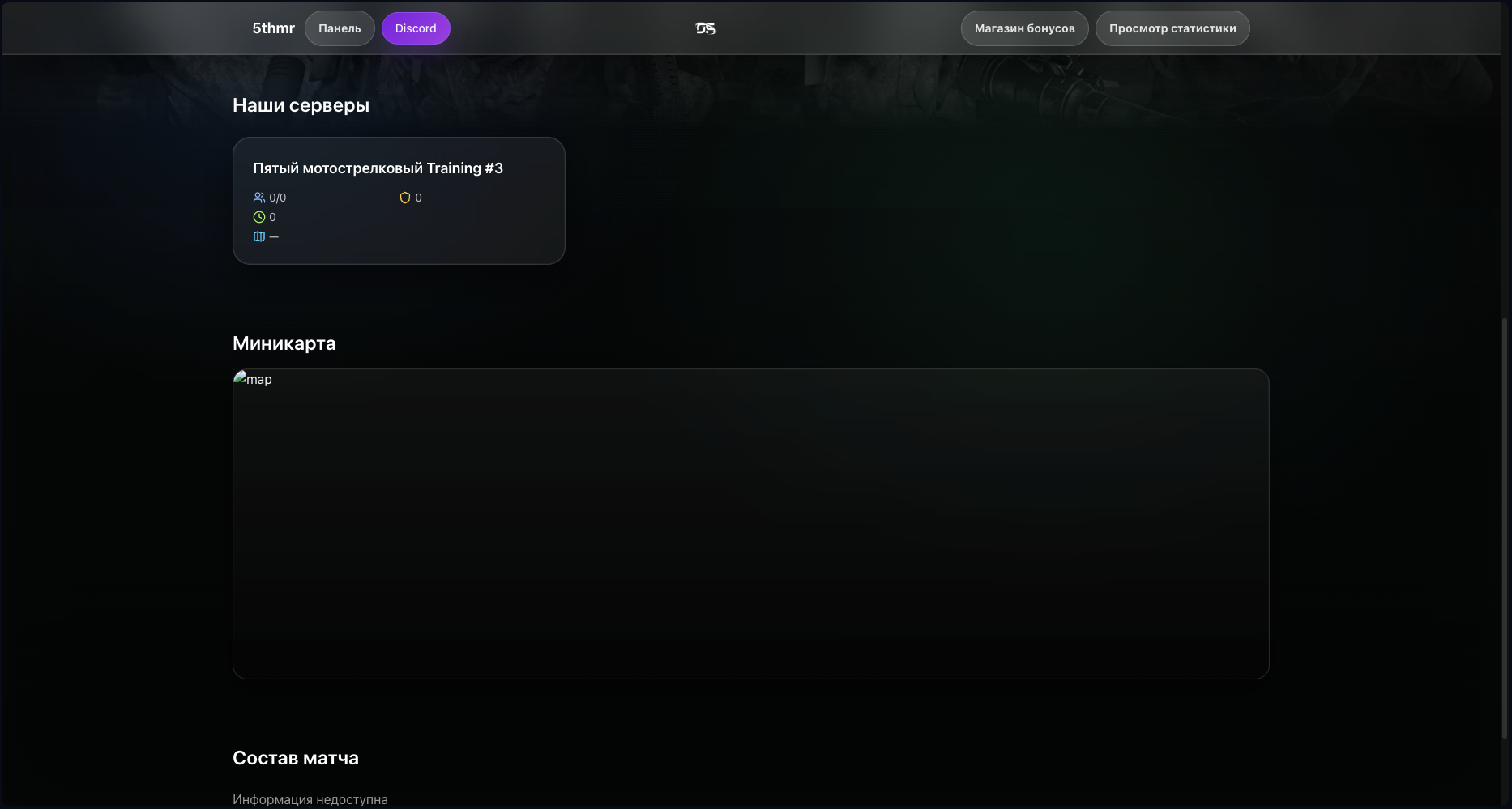
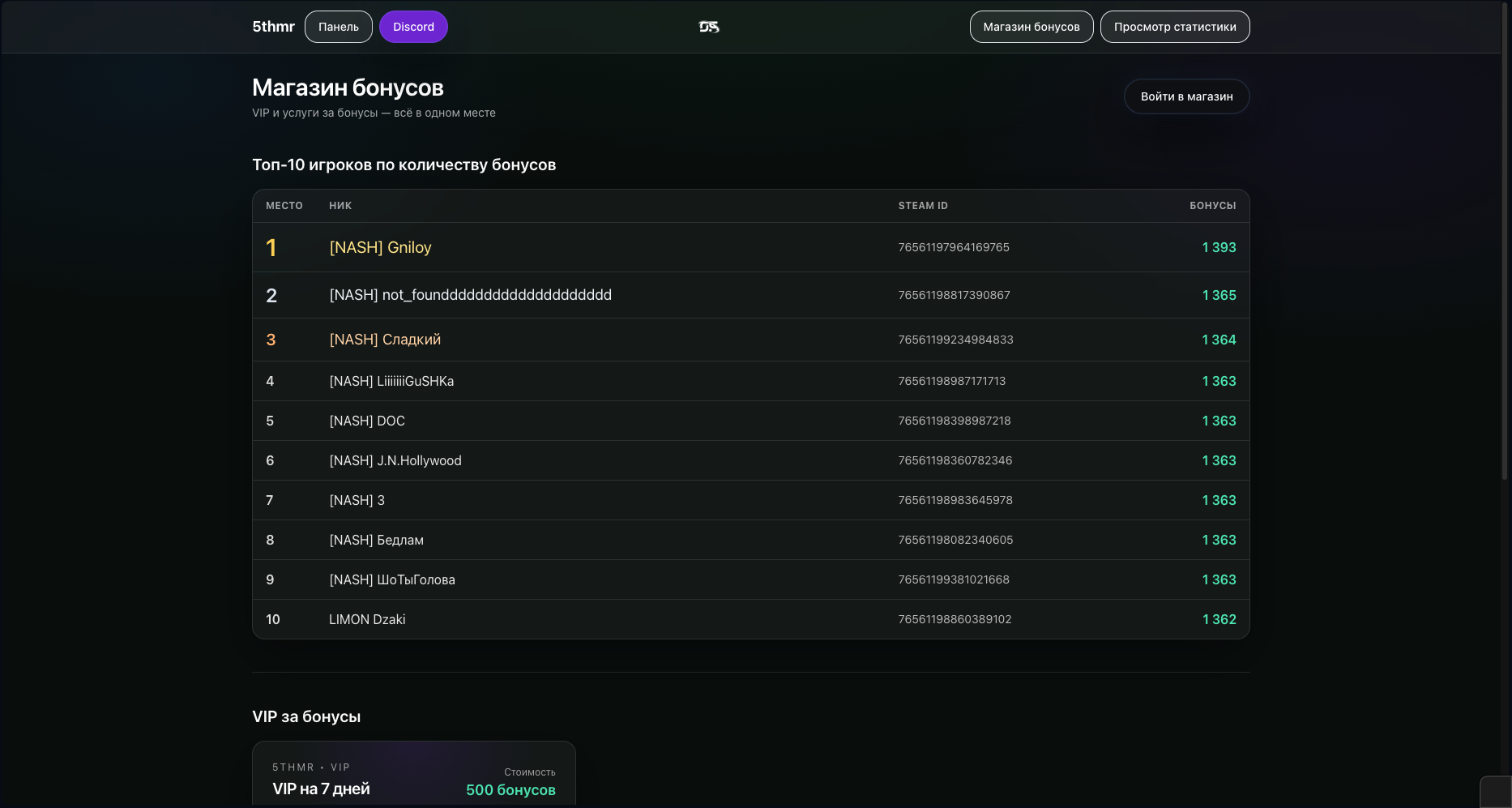
  • Player-facing features: stats bot, bonus shop and a landing page showing the current match lineup.
  • Deep integration with Discord and your internal project tooling.
  • Open, well-documented Squad API for bots, automation and external panels.
  • Emphasis on performance and stability so the admin panel is never the weakest link.
Example of a legacy Squad admin web interface

Squad admin panel and Squad server administration

SquadFlow is a dedicated Squad admin panel built for game server owners and community staff. Instead of raw RCON tools and outdated dashboards, you get a clean web-based Squad admin tool where you can manage servers, review player activity, react to reports and apply warnings or bans in a few clicks.

All core Squad server administration tasks live in one place: a server list with maps and player counts, real-time logs for kills, deaths, chat and reports, full-text search by SteamID, a structured ban system and lightweight analytics. If you maintain public or private Squad servers and you need a reliable squad admin panel, SquadFlow is made for this use-case.

Admins often search for “squad admin”, “squad admin panel”, “squad server administration” or “squad admin tools” when they are looking for modern control panels. SquadFlow is exactly that — a modern Squad web admin panel that can become the central hub for your community.

Plans

Prices are shown per SquadFlow installation. Extra services and customization of your Squad admin panel can be discussed separately.

SquadFlow Base

Base version
10 $
  • Core Squad admin panel features
  • Server and player management
  • Bans, logs and basic analytics
Request access

SquadFlow Plus

Plus on top
15 $
  • Everything in SquadFlow Base
  • VIP bot integration for Discord
  • Public landing page for your project
Request access

SquadFlow Pro

For advanced communities
30 $
  • Everything in SquadFlow Plus
  • In-game bonus shop based on player bonuses
  • Deeper Discord integration: match result bots, stats bots and more
Request access

What SquadFlow looks like

The interface follows your mental model of a Squad admin panel: servers, players, chat, logs and rules. No visual noise, no unnecessary clicks.

Squad admin panel dashboard view in SquadFlow
Squad admin panel chat and logs view in SquadFlow
Squad admin panel players list view in SquadFlow

Frequently asked questions

Do I need separate hosting for SquadFlow?

No. SquadFlow is a hosted web-based Squad admin panel. You simply connect your existing Squad servers via configured access keys.

Can I manage multiple Squad servers?

Yes. The panel is designed for multi-server setups and distributed admin teams.

Does it support API and Discord?

Yes. There is open Squad API documentation for bots and external tools, and a Discord integration for notifications and actions from chat.

Are there roles and permissions?

Yes. You can define roles, limit actions per role and avoid sharing raw server credentials.

SquadFlow Squad admin panel logoSquadFlow is a control panel for Squad servers and a modern Squad admin tool built for admins and communities.
© 2025 SquadFlow. All rights reserved.